¶ What Do I Need to Keep?
First, a list of non-negotiables that are asked for, no matter what system you are using.
- All Board Minutes for each year should be filed together in one folder, in date order, not scattered through the months.
- All Bank Statements for each year should be filed together in one folder, in date order, not scattered through the months.
- All 1099s for each year should be filed together in one folder, in date order, not scattered through the months.
- All Jewel Financial Summaries should be filed together in one folder, in date order, not scattered through the months.
- All W-9s for ALL years should be kept together in one folder, permanently, in the file box where they can easily be found.
Are you seeing a pattern? Kept together. One folder per year. Filed in date order. Whether you use a box or a file drawer or a binder.
¶ Shopping list for this method
- Plastic file box with lid
- 15-20 hanging files
- 35-40 manila folders
- Shoe box (cardboard or plastic)
- Various supplies like stapler, staple puller, pens of several colors, rubber bands.
¶ Front Folder
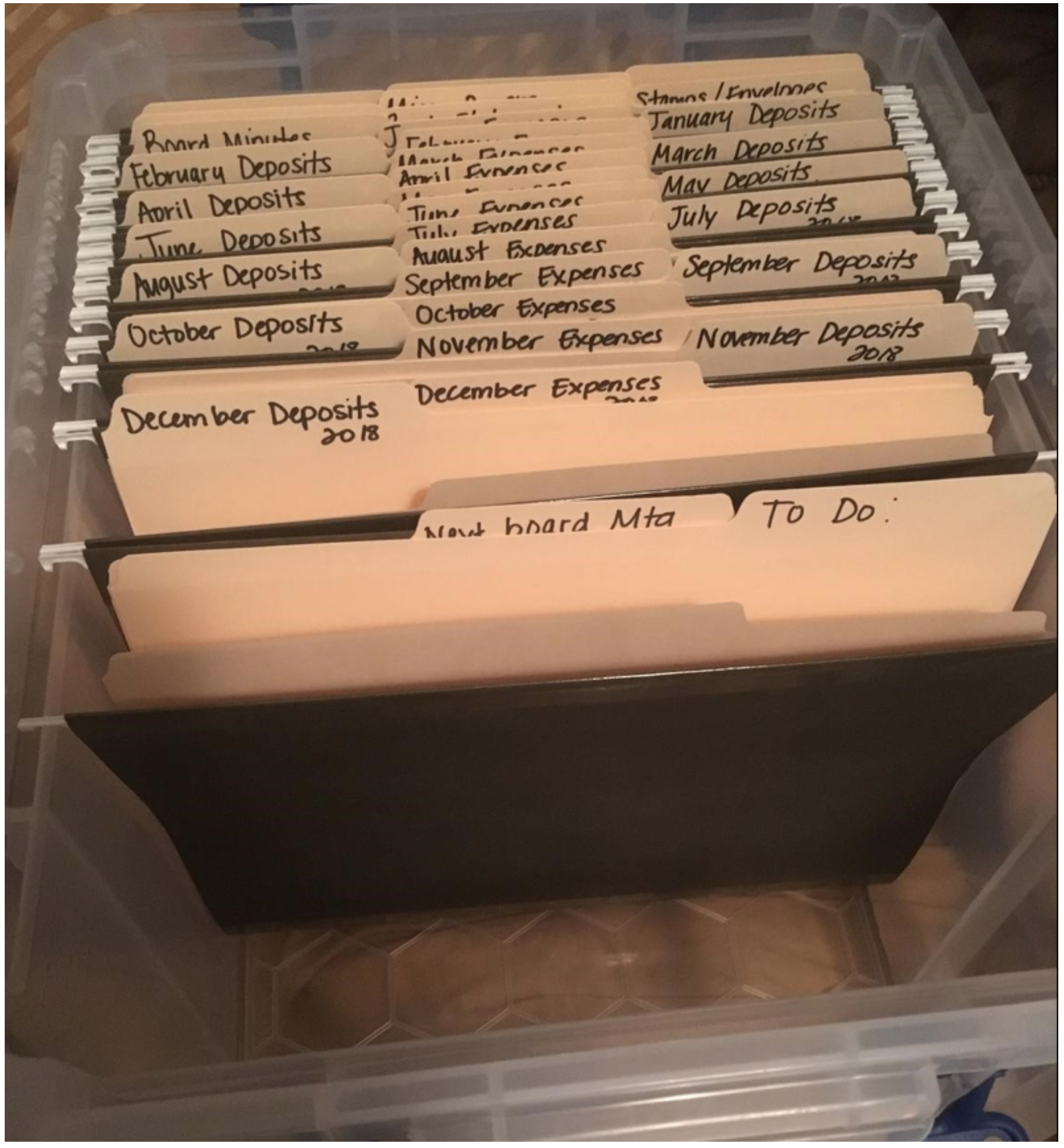
Start with one hanging file at the front of the file box or drawer, with two file folders in it, labeled:
- Next Board Meeting: All through the month, when you have a reminder note, a reimbursement check, the monthly reports for the next meeting – ANYTHING that you need to remember to take to the next board meeting, drop it into this folder. Then when the meeting arrives, grab that folder and go! Then use that folder to bring home papers like board minutes from the previous meeting, check requests or receipts that people give you at the meeting.
- To Do: Every time a bill comes in or something that needs to be filed or dealt with later, you can drop it into that folder where you can find it easily.
Making a habit of using these two folders consistently will save you time and frustration.
¶ Monthly Folders
Twelve hanging folders, each with an Expense folder and a Deposit folder, labeled from January to December. You can line them up front to back or back to front. Just be consistent.
¶ Expense Folders
The monthly Expense folder will contain documentation for every check (paper or electronic) that you write each month. The documentation for the expenses should be filed in check number order (for written checks) or in date order (for electronic payments). Again, front to back or back to front. Just be consistent.
Some treasurers write “paid” and the date and the check number on each invoice or statement. Others print a copy of each Jewel check and attach the receipts or invoices to it.
That works for every check that you pay from a statement or invoice.
¶ What about if you don’t have a receipt or invoice or statement?
What about…
- The conference remittance? Print the check on plain paper and file it in check number order.
- Payroll? Print the statement page you receive from the conference local payroll department for your files. Pd/Ck#/Date. File it.
- A reimbursement? A completed check request form should accompany every reimbursement request. Attach the receipt(s) to the check request form and file it. If your church doesn't use a check request form (they really should!), then print the check on plain paper and attach it to the receipts.
- A voided check? Write VOID on the check and attach it to a blank sheet of paper and file that paper in check number order.
- A check to SURF or a savings account? Print a copy of the check from Jewel on plain paper and file it. (The check should already have in the memo line the date of the board vote. If not, that could be added to the page you are filing)
- Something ordered online? Print off the page(s) that shows what was purchased, from where and how much. Pd/Ck#/Date. File it.
- Assisting a needy person? Utility companies and hotels and landlords can provide receipts. Attach it (them) to a plain piece of paper. Pd/Ck#/Date. File it.
- School Subsidy and monthly donations check to your school? Print off a copy of the Financial Summary for that month, showing the ending balance before you write the check, circle the amounts you are adding together to equal the check. Pd/Ck#/Date. File it.
- Cleaning person or lawn mower is paid as independent contractor? They should be providing you with a monthly statement that you can pay and file. Even if it is handwritten from a simple receipt book. It should have their name, the date and the date range that you are paying as well as the amount.
- Debit receipts? The cardholder should use the “Debit Card Activity Report” to turn in their receipts. If your church doesn't use such a form, print a copy of the check on plain paper and attach to the receipts.
- ACH or Electronic Payments? You won't have a check number for these or the Debit Receipts. But you still write "E-Paid" and the date that the payment occurred. If you have a lot of these, you might want to sort them separately from the check numbers--filed by date order, but placed in the back of the file folder.
If any documentation is smaller than ½ page, attach it to a full sheet of paper so it doesn’t slide down and get lost.
In order to minimize your need for storage space, get rid of all unnecessary pages from the expense file. Like the extra pages in the utility bill. The envelope that the bill was mailed in. Advertising pages in the Bank Statement or the Credit Card bill. Long, long tails on receipts. Old snail mail payment envelopes that you don’t use. If it has any account numbers visible, shred it. Otherwise, in the trash it goes! Keep what needs to be kept, but not everything else. (If you are not sure what to keep, ask an auditor.)
Any questions? Every payment. Documented. Every month.
It actually takes longer to read about it than it does to do it, once your system is set up.
¶ Deposit Folders
Each treasurer has a certain way they file the offering deposit paperwork, often because the previous treasurer did it that way. In the counting process some of you create extra spreadsheets or handmade lists. Many print out trial deposits and contribution reports to file with each offering. We understand that double checking and verifying your figures gives you peace of mind, but it is not necessary to file all those extra papers.
If your church is of small to medium size, the only thing you really need to put in your Deposit folder each month is your two Adventist Giving Transfer Reports and any other deposit receipts, such as the occasional stub from the GCC Evangelism check or a bank deposit slip from something like rental income. The rest of the necessary papers can be filed in a shoe box or plastic shoe bin along with the tithe envelopes.
¶ So what are the “necessary papers”?
- Some type of Loose Offering Count Sheet(s) signed by two people
- Some type of Tithe Envelope Verification Sheet(s) signed by two people
- The deposit slip from the bank.
All wrapped around the tithe envelopes. Fold full sheets in half from top to bottom, then in thirds. This should make them about the same size as the tithe envelopes. Wrap around the envelopes, and secure with a rubber band.
Make sure to write the date and the offering deposit amount on the outside of each weekly offering packet. Store them in a shoebox, in date order, (bundling each month’s offerings together in another rubber band) or purchase a Sterilite shoe box at Walmart. (It must be the one that is 14 3/8” L x 8 1/4” W x 6” H or the envelopes won’t fit.)
Once your count sheet and verification sheet match the bank deposit total, there is no need to have any other papers on record in your file. If there are handwritten notes regarding an adjustment or error, transfer them to the count sheet or to the tithe envelope that is being adjusted. You don’t need to fill your file with extra notes and charts, Trial Deposits and Contribution Reports, so there is no need to print them every week/every month.
HELPFUL TIP: Make sure you write on each non-offering bank deposit slip the origin of the money that was deposited before you forget it. (GCC Evangelism, Rental Income, etc) One auditor had a very large "ghost deposit" for about 6 months in one church because no one could remember where it came from or what it was for. They ended up putting it in the wrong account and had to reverse it once the donor got their tax receipt and asked where their donation went! It helps to attach the deposit slip to a full page and then write where it came from and what it was for on the page and file it in the Deposit Folder that way. Tiny deposit slips can get lost.
If your church is really small (maybe just 5-8 checks per month), you could use four Expense and four Deposit folders for the year instead of twelve. Quarters instead of months. Ex: "1st Quarter 2026" folder would contain January through March, etc. Still filed in check number order, of course.
If your church is large and you have many pages of documentation for each offering, you can staple each week's count pages together and file them in the deposit folder in order if you wish. Wrap the tithe envelopes in plain paper to store them, so you have a place to write the date and amount.
Inexpensive. Simple. Easy to Customize. Easy to file. Easy to search. Easy to store. If you use this filing method, a year’s worth of records will take up less space than you might think. This will save on the size of the file cabinet that the church needs to have.
¶ Annual Folders
After the monthly folders, there is another hanging file with three folders in it. Labeled like this:
- Bank Statements – (the year): Place all bank statements (with Bank Reconciliation Reports attached) for the year (in month order or reverse month order) in this folder. If you have savings or SURF statements, put their statements in order in the back of the same folder. NSF notices from the bank should be stapled to the bank statement where they are deducted.
- Board Minutes – (the year): The treasurer should have copies of the minutes for every board meeting for the year on file. They should be translated into English and filed in date order.
- Monthly Reports – (the year): Once you have closed the month, copies of the Jewel monthly reports should be provided to the board members. After the board meeting, file one set away in this folder in case of questions later.
¶ Other Folders
If your office is your kitchen table, it might be helpful to add another hanging file at the back and put things like stamps and envelopes in it. Another hanging file could contain a supply of blank Check Request Forms and Count Sheets. (A colorful pocket folder stocked with Check Request Forms could also be stored in the office at the church, so members can find and use them.)
You can also fill a zippered, bank-type bag with everything you need when you sit down to do treasury work. Tape, pens, scissors, stapler, staples, rubber bands, a marker, etc, so they are at your fingertips. When finished, put it all back in the bag and drop it into the back of your file box for next time.
Then there is the array of documents that don’t really fit anywhere. Insurance policy papers, your Federal tax identification number, sales tax exemption certificate, and any other correspondence relating to the church books. One idea is to just have a file folder in the back of the box that says “Keep” on it, and sort through it at the end of the year to see if it was still important. If it is, leave it in the box through the next year. You can add any other folders and files that you wish. Whatever keeps you organized. But these are the "basics".
¶ Filing Tips
¶ End of year storage
Once December is done, storage is simple. Some treasurers may wish to keep the records at their house through February in case they need them. But after that, if you have a locked file cabinet at the church, just pull the hanging folders and file folders out all together and transfer them to the church. They are already labeled as to month and year, and nothing else is needed.
If your current records are stored in a box, at the end of the year you can pull the file folders out, (leaving the hanging folders in the file box) and wrap them all, in order, with a couple of large rubber bands, horizontal and vertical, and find a box that is big enough for them and the tithe envelopes for the year. Label and store. Then label new file folders—it will all take you less than an hour.
¶ How long do we need to keep all these records?
- Jewel Monthly Printouts – Can be discarded after each audit
- Cash Receipts (Primarily for Schools) – Keep 6 years
- Check Back-Up (Invoices, statements, receipts, etc.) Keep 6 years
- Bank Statements & Reconciliations - Keep 6 years
- Tithe Envelopes – Keep 6 years
- Insurance Policies - Keep 6 years
- Board Minutes – Church and School – Keep Permanently
- Employment Records - Keep Permanently
- Legal Documents - Keep Permanently
- Church Clerk Records – Also Keep Permanently
- See the full list at this link.
So if you have records that are older than 6 years, many of them can now be shredded or burned. Make sure you sort through carefully and pull out any legal documents (mortgages, etc) and employment records and board minutes first. Next year you can discard another year’s records, and so on. Doing this annually will keep the records down to a manageable storage volume.
A big advantage of this filing system is being able to pull out an individual file folder and know that nothing in it needs to be kept, because everything that needs to be kept is in a separate folder. You won’t have to sort through every scrap of paper before discarding the expired documents.
And that will save you time.
We leave you with a picture of a file box created by a treasurer, using these instructions.
Click here for more topics related to File Management, Recordkeeping, Form Info
The original version of this page was provided to Jewel by the Georgia-Cumberland Conference Audit Team. Created by Linda McCabe.