NOTE: Churches come in all shapes and sizes and have varying financial needs. No matter your church size or financial condition, here are some general principles.
Jewel allows budgeting in two ways - by dollar amounts, and by percentages. The recommended method is to use dollar amounts, because it is simpler and more accurate. See Using Percentages in Allocations below for more info.
Jewel will use the budget values you enter to create the "Monthly Budget" and "Annual Comparison" reports, which can be used to monitor how your spending compares to your budget throughout the year.
Generally, you should start planning your upcoming year's budget about two months before the end of your fiscal year. So churches whose fiscal year matches the calendar year should start planning in November. If your fiscal year runs from August to July, start planning in June.
¶ Which Local Funds?
First, decide which Local Funds should be included in the Budget Allocations.
- List all of your Local Funds that are used for monthly expenses – especially those that don’t typically receive donations. Utilities, Supplies, Lawncare, Custodial, Facility Maintenance, and Mortgage or Loan Payments. Include funds that often receive at least some donations, like Sabbath School Expense.
- Especially if you own your building, add your annual Property and Liability Insurance payment. It is usually sizable and is only paid once a year, so it is good financial management to put aside money for it every month.
- If you have any active local ministries that have an annual budget set by the board, add them to the list as well.
Note: It is not necessary to allocate to each obscure, inactive or rarely used Local Fund. If you do “wishful budgeting,” allocating to ministries that you hope will use it, you will end up with Church Budget money sitting unused. Allocating only to active ministries will give more clarity to the reports. Ministries can be added mid-year, if they become active.
¶ Figure Monthly Allocations
Once you have chosen your funds, figure out how much to allocate, monthly, to each account.
- Pick an expense – let’s say Electricity. Choose the most recent 12-month period.
- Total up how much you spent on that expense during that period.
- Divide that total by 12
- Round up to a whole dollar amount for simplicity
Note: An easy way to find 12 months of expenses (if posting has been done correctly) is to select the previous 12 months (Example: 05/01/25 through 04/30/26) or the Last Fiscal Year on the financial summary and look at the Checks column.
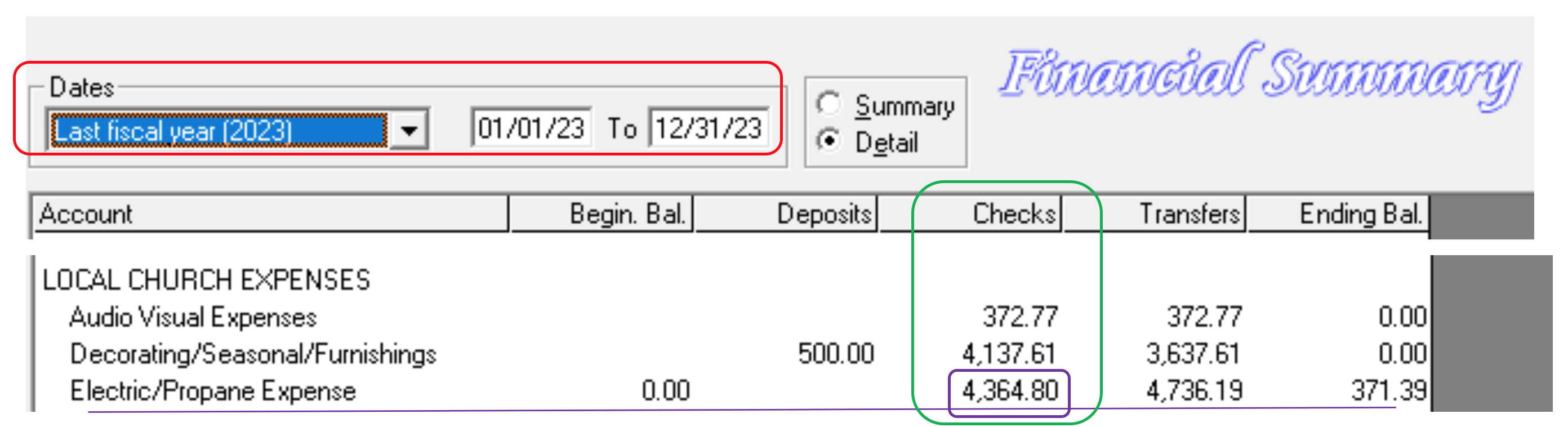
Example: Electricity/Propane Expense. $4364.80 total for 12 months. Divided by 12 = $363.733333. Round up. Budget $370 or even $400 monthly to give a cushion, since it generally goes up every year.
If there have been recent changes in monthly costs – a new church building for example – take that into account, in order to be as accurate in your allocations as possible.
If you are planning new programs or activities, take them into account as well.
Note: If, in the past year, electric bills were sometimes posted to Electricity, sometimes to Church Budget and sometimes to Misc. Expense, the annual electric expense will have to be totaled manually. But if posting has been accurate and consistent, you can find what you need in minutes.
Do the same for each of the other Local Funds that you have chosen. Calculate the yearly, divide by 12, round up a bit. Allocations will look cleaner with whole dollar amounts rather than cents.
¶ Consider Donations
Next, consider how much is coming in through directed donations. If an account is receiving enough from donations, you do not need to also fund it in the budget. If it has some money coming in, like Sabbath School Expense, a Mortgage or a School Subsidy, you can allocate less to it than if it was totally budget funded.
Note: An easy way to find 12 months of donations (if posting has been done correctly) is to select the previous 12 months (Example: 04/01/2025 to 03/31/2026) or the Last Fiscal Year on the financial summary and look at the Deposits column.
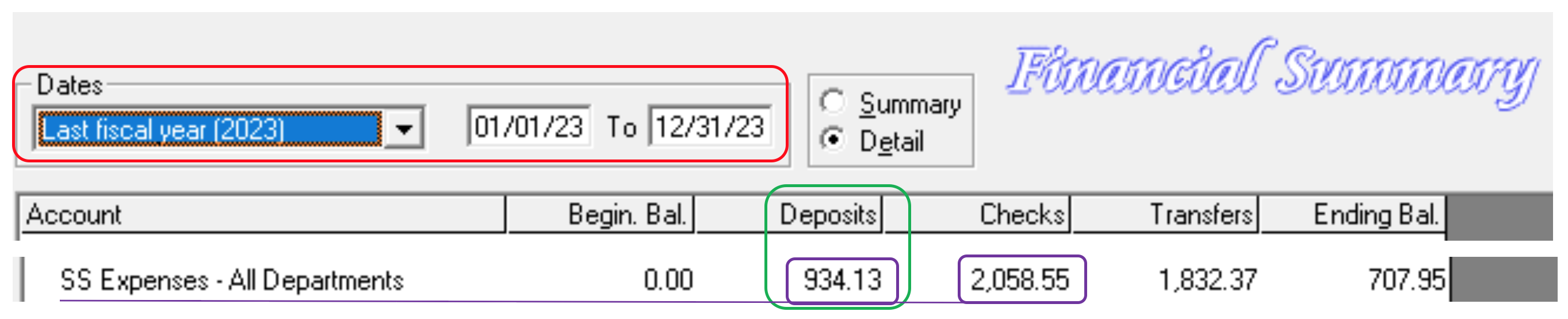
Example: Sabbath School Expense
$2058.55 annual expenses – Checks column
$934.13 annual SS offerings – Deposit column
$1124.42 was needed in 2023 from allocations. Round up to $1200.00
Divided by 12 = $100 is monthly allocation
If you have any active local ministries that have been given an annual budget, divide by 12 and allocate.
Note: Some churches give their ministries their annual budget all up front and they spend it down all year – it doesn’t need to be allocated – but not all churches can afford to do it that way. Either method is fine.
¶ Set Up the Jewel Budget
Once you have your list and your numbers, you can set them up in Jewel.
- Go to Maintenance → Edit Budget Allocations.
- Select the year for which you are making your budget. You can either edit your current year's budget (which will affect only this and future months, not past months), or enter the new budget for the next fiscal year.
- Enter the Total Annual Budget. This is an estimate of the total amount you expect to spend from the accounts included in the budget. The better your estimate, the better the information you'll get from your budget reports.
- Under "From Account" select the account that is serving as the source for budgeted funds. This will usually be Church Budget, depending on how your church's accounts are set up.
- Under "To Account(s)", select the accounts you're budgeting to, and fill in the monthly amounts budgeted to each. Enter dollar amounts by simply typing in the amounts. To enter percentages, type the percent number followed by the percent sign (%).
- As you enter the values, watch the "Monthly Allocation Totals" in the middle of the screen. They will change according to the values you enter. When you have finished, the dollar amount should equal about 1/12 of the Total Annual Budget (or less if you're using percentages) and the percentage should equal either 0% or 100%.
- Click OK to complete your budget and let Jewel store the values you have entered.
NOTE: The beauty of using Jewel Budget Allocations is that they are very easy to edit. If, after a few months, it is obvious that a particular fund is over-budgeted or under-budgeted, point out the need to the board, and if they authorize it, you can adjust it in seconds. Just go to Maintenance/Edit Budget Allocations and change what is in the Amount box and then click the green OK √ to save it and leave.
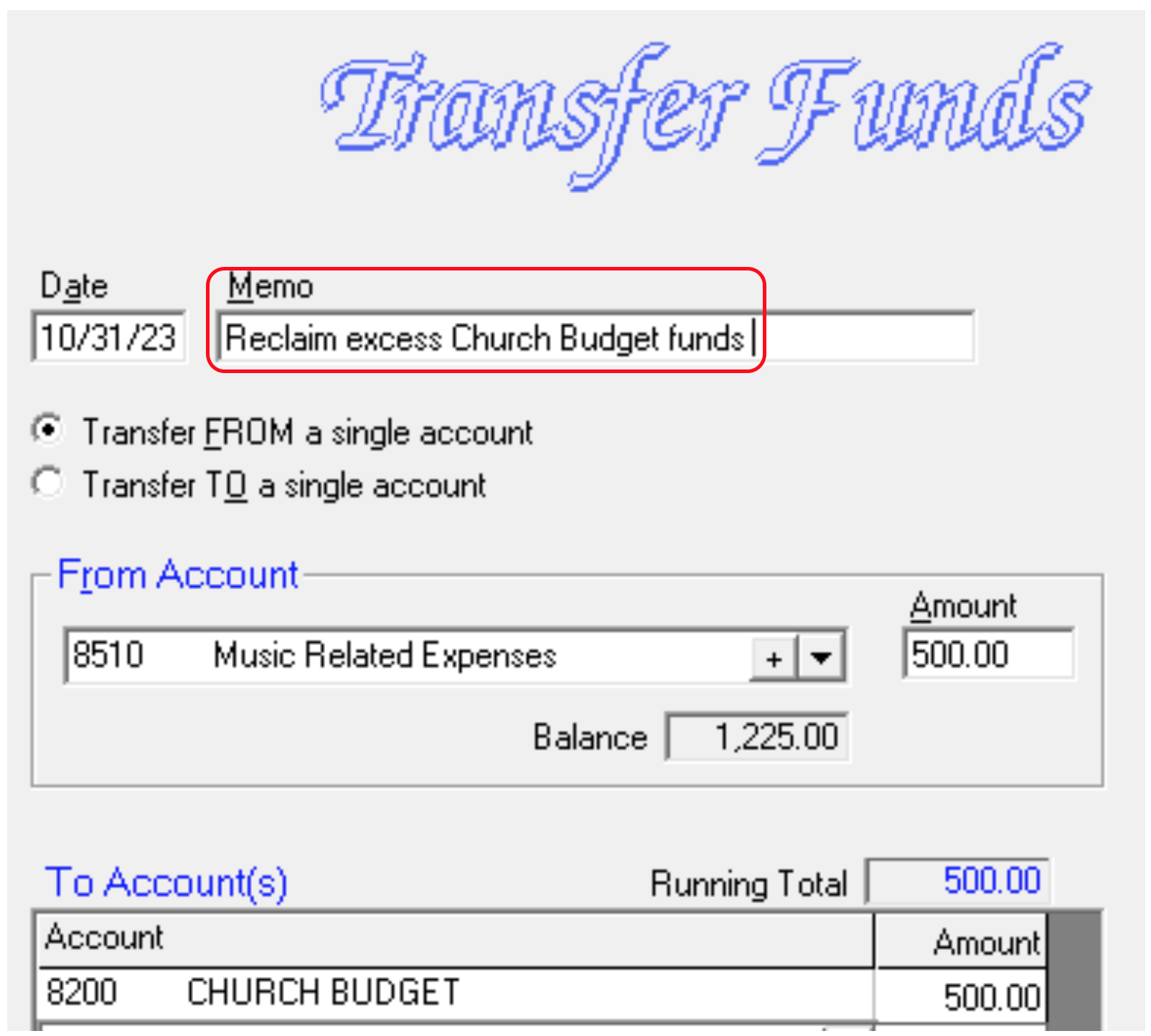
If it becomes clear that a certain account has been overfunded, you can, with board authorization, make a transfer to reclaim the amount that you don’t need. In this case, $500 of excess Music Related Expense funds are being transferred back to Church Budget.
Use the “Transfer Funds” button on Jewel’s home page to create this entry. Make sure the memo clearly indicates the purpose of the transfer.
As long as the allocations originally came from Church Budget, you can safely transfer them back into Church Budget.
Note: Some expenses (certain utilities) are seasonal and will fluctuate, and some expenses (Property/Liability Insurance) are paid annually, so you need the balance to build through the year. But if you only need hundreds per year to cover expenses in a certain account, there is no point in building up a balance of thousands. And if an account is hundreds of dollars in the negative over several months don’t wait until the end of the year to address it with the church board.
¶ Review
- Know how much is needed, monthly, by analyzing how much has been spent.
- Calculate offering income for funds that receive donations.
- Create Budget Allocations for the year based on those two factors.
- When large, unbudgeted expenses occur, ask the board for authorization to make a one-time transfer from Church Budget to eliminate large negative balances.
- Adjust the Budget Allocations mid-year if it becomes obvious that the needs have changed.
¶ Using Percentages in Allocations
It is possible to set up your Jewel Budget Allocations using percentages, in which 100% of your Church Budget donations are allocated to one Local Fund or another each month. You can do this by entering percentages for all accounts, or you can mix percentages and dollar amounts.
If you choose to mix percentages and dollar amounts, then the accounts for which you enter a percentage will receive funding from what is left after all the dollar amounts have been allocated. For example, if Church Budget received $1500 during the month, and the Monthly Allocation Total Cash Amount is $900, the difference of $600 will be divided between the Percentage accounts.
In general, use dollar amounts for monies that you must spend, like the mortgage and utilities. Other items you may choose to fund as percentages, so that they only receive funds if there is sufficient income, like Flowers or Prayer Ministry.
Note: Think carefully before using percentages, for the following reasons. For more detailed analysis, read the Percentages vs Dollar Amounts in Allocations comparison.
- Percentages are more difficult to calculate than whole numbers, and if they are off just a bit, one Local Fund can accumulate thousands of dollars while other Local Funds have large negative balances.
- Because this method leaves the Church Budget account with a zero balance at the end of every month, it can be difficult to cover unexpected expenses.
- Adjusting allocations mid-year is more difficult if you use percentages. Since the totals of all the funds must equal 100%, you cannot just lower or raise the percentage of one fund without adjusting others as well.
If you still wish to use percentages, configure them by dividing each Local Fund’s annual needs by the annual Church Budget offering total (if you are mixing dollar amounts with percentages, use the Church Budget total - annual fixed dollar amounts). The Church Budget line in the Deposits column will tell you how much was donated to Church Budget over the course of those 12 months.
Example 1: Women's Ministry costs were $2,400 over the last 12 months, and Church Budget donations were $35,200. This church is using only percentages. Then 2,400 ÷ 35,200 = 0.068 or 6.8%
Example 2: Women's Ministry costs were $2,400 over the last 12 months, and Church Budget donations were $35,200. This church is allocating a dollar amount of $25,000 annually to mortgage and utility costs, leaving $10,200 to divide among the percentage accounts. Then 2,400 ÷ 10,200 = 0.235 or 23.5%
Your total percentages, when added up, must equal 100% in order to finish and move forward. Some churches will put the balance of the 100% in a Reserve or a Building Fund.
Note: It is best to arrive at 100% on paper before you enter them in Jewel. If you enter them all in Jewel and they total 99.8%, you won’t be able to save them and you might end up accidently losing them all while trying to finish.
¶ Special Appeals Are Not a Budget Strategy
One last, very valuable tip: Do not use special appeals from the front as a budget strategy. Let’s say you have a deficit in your Audio/Visual Fund and you say to your church, "We have purchased a new mic. Anyone that wants to help pay for it, mark your envelope with 'new mic' and turn it in." Your Church/Combined Budget giving could then go down, as people give to purchase the new mic, which may end up hurting your budget process. This may also result in a very healthy A/V Equipment Fund, but since those donations can’t be used for anything else, that money may sit there while other funds are underfunded. Which can lead to more needs and more appeals from the front, ultimately resulting in chronic Church Budget deficits.
If you want to mention giving from the front, let people know that consistent giving to Church Budget is the best way to maintain healthy church finances. And remind them of all the various ways Church Budget donations are used.
And that is it for setting up basic Budget Allocations. It may sound complicated, but once you get the allocations set up, you will be glad you did.
Click here for more topics related to Budgeting
The original version of this page was provided to Jewel by the Georgia-Cumberland Conference Audit Team. Created by Linda McCabe.