¶ General Overview
When you go to church each week, you can drop your offering in the plate or bag or bucket, or if you are at the piano when the offering is taken up, you may have to chase down the deacon or treasurer at the end of the service! But once the counting is finished and the treasurer has left the building, that is it until next week.
AdventistGiving is different. You can donate all day, all night, any day of the month. But at some point, they have to close that offering and start a new one. And they do that twice a month.
On the 15th of the month, at midnight, AdventistGiving closes or cuts off the offering and opens a new offering. They then total up all the donations given during the first half of that month and a deposit report is prepared and posted to your church’s AdventistGiving page, usually by the next day after the cutoff. Then the donations that were collected from the 1st through the 15th are deposited into your church bank account several days later.
Any donation that is given after midnight on the 15th is included in the next “offering plate.”
On the last day of the month, at midnight, that offering is closed/cut off. Whatever your donors have donated to your church’s AdventistGiving account during the last half of the month is counted and a deposit report is prepared and appears on your church’s AdventistGiving page the next day. And the deposit shows up in your church checking account a few days later.
Two Adventist Giving Deposits per month. Over and over, throughout every month of the year.
¶ What offering date should I use?
This is what your church’s AdventistGiving page will look like when you log in. Notice the heading. “Official Deposit Reports.”
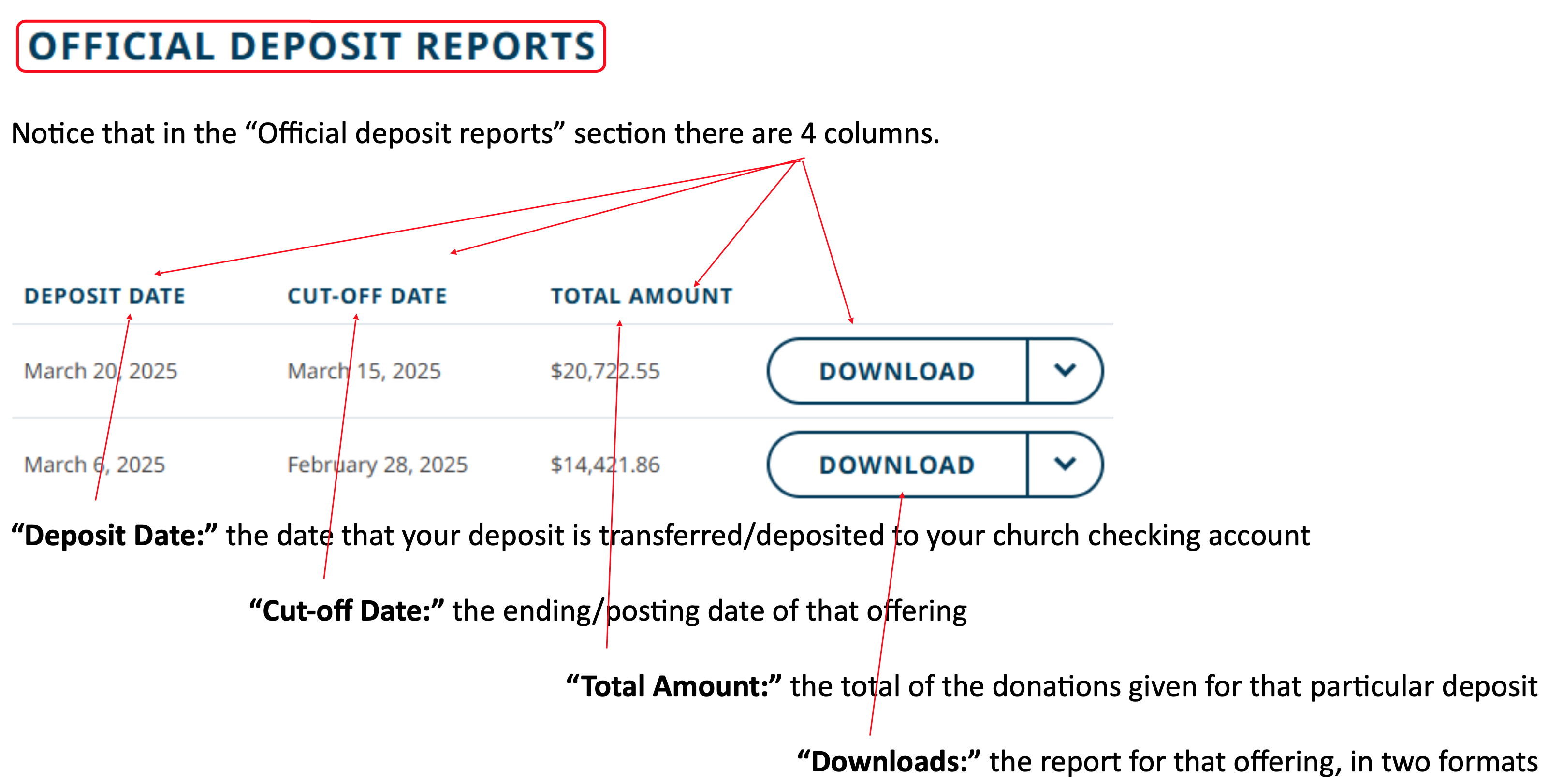
It is very important to understand the difference between the Deposit Date, the date that the offerings are deposited to your bank, and the Cutoff Date, which is the actual date that should be used when this deposit is posted in Jewel. And if you import, Jewel will automatically use the Cutoff Date.
All offerings should be entered into Jewel in the month they were donated, not the month they were deposited.
If February 28 was a Sabbath, you would count the offering and take it to the bank sometime in the next couple of days, and it would show up on the bank statement in March. But you would still enter it in Jewel as a February offering, not a March offering. AdventistGiving works the same way.
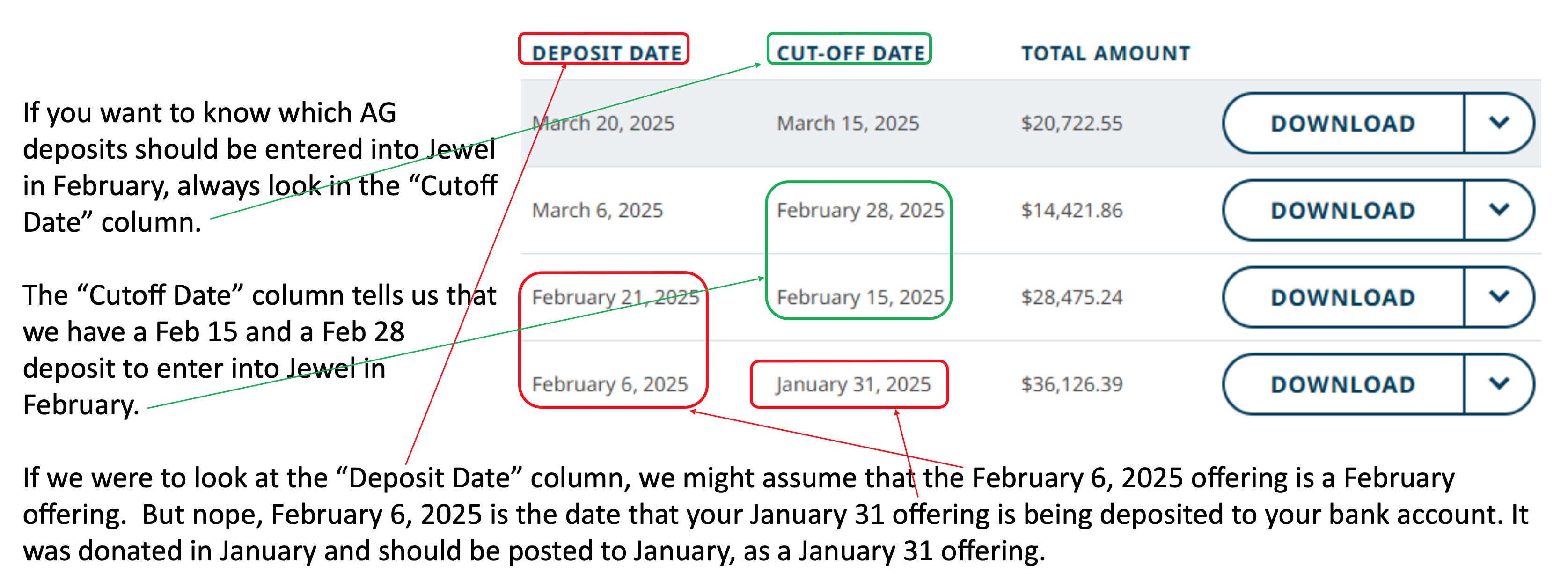
NOTE: The Cut-Off Date tells us what month these offerings were donated. The “Deposit Date” tells us what month they were deposited. Ignore the “Deposit Date,” use the “Cut-Off Date.”
¶ What about pending donations? When do I enter them?
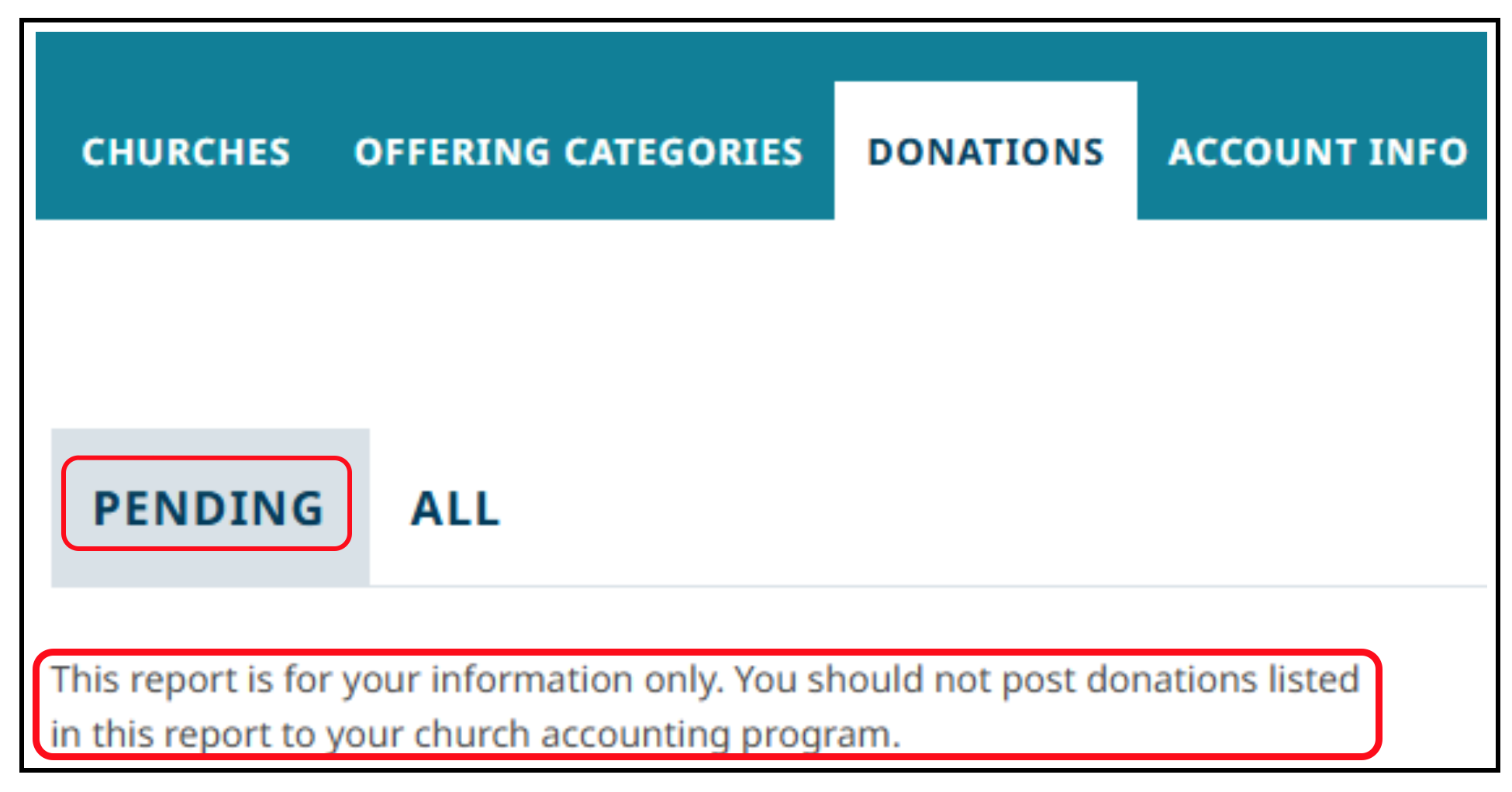
Let’s look at “Pending” donations. If someone says to you “I just donated for the first time last night, and I want to know if it worked. Can you check for me?” You can log in, enter selected dates, and verify it for them.
But, you should never use the “Pending” list to enter donations into Jewel. See, AdventistGiving tells you that right on the screen.
Always use the “Official Deposit Report” that comes out twice each month.
¶ Why are these instructions so important?
Why are we making such a big deal out of posting the correct AdventistGiving offerings into Jewel? So you don't have to call tech support to fix errors that come from doing it incorrectly. Errors like:
- If you are not crystal clear about which offering belongs in which month, sometimes you will put the March 31 offering in March, and sometimes you will wait and put it in April. And sometimes you will accidentally put it in both March and April.
- Or you will assume you put it in March when you didn’t, and you won’t discover it until it pops up on your bank rec and you realize you didn’t enter it at all, at which point you will need tech support help to enter it, and your bank rec will be delayed as we fix it.
- Also, skipping or duplicating offerings causes your monthly remittance to the conference to be incorrect, sometimes by quite a lot.
- And last but not least, if you are not in the habit of dating and posting the AdventistGiving offerings correctly, you will likely post the December 31 AdventistGiving offering incorrectly – to January of the next year.
- Which will mean that your donor receipts for the year are inaccurate.
- Which makes for unhappy donors and having to issue corrected end-of-year tax receipts.
You can see why this is one of those cases where we are very specific on the correct way to do it. Because doing it incorrectly will cost both you and your tech support a lot of time in the long run, and doing it right keeps you, your donors, the conference, and the IRS happy. It is well worth the time it takes to learn to do it right!
And, if you get this nailed down, your AdventistGiving experience from here on out will be smooth sailing. Because what we just went through, getting the correct report into the correct month, is the hardest part of AdventistGiving. It is all downhill from here!
Click here for more topics related to AdventistGiving Offerings
The original version of this page was provided to Jewel by the Georgia-Cumberland Conference Audit Team. Created by Linda McCabe.